What Have I been up to Recently?

Work In Progress / 29 June 2020

So I just looked and apparently it's been 4 months since my last blog post?! Time flies when you are in lockdown playing Cod Warzone...

I hope that everyone is doing well :) I just wanted to write a post to let everyone know what I've been up to and give you some updates on how my personal projects are going. Over the last few months I have been working from home and I've pretty much barely left the house which i'm sure is the same case for a lot of people right now due to being in lockdown. At first during the first month of lockdown, I just wasn't in the mood to do any personal work what so ever and I ended up playing a lot of Call of Duty Warzone with my mates as it was quite fun to play and it was nice to get some social interaction as I currently live alone and I wasn't really leaving the house to see anyone.

I think it's always good to take a break from personal work because you don't have to do it 24/7. However, moving onto the second month, I was ready to get back to the personal projects that I had planned, Unfortunately, work really picked up that month and we ended up having to do a lot of overtime which meant that I just didn't have the time to do any personal work what so ever. One of the plus sides of this is that I was that busy, I barely even noticed that we was all still in lockdown and that month pretty much flew by. 

At the start of this month, I was ready to get back cracking with the personal work and I've managed to get a lot done despite taking a week off to play through the last of us 2. Amazing game if anyone hasn't played it yet, really worth getting! My main goal at the moment is to get better at concept art and I'm trying to come up with a good workflow that I can use to quickly concept environments. In the images that you can see below, the workflow that I am using is:

  •  Quickly model and throw assets in to UE4 with the help of some mega-scans assets to quickly block in the scene.
  •  Render out an image using the Octane Render plugin for UE4 which gives me more realistic renders. Making sure the environments look good.
  • I will then use Daz 3D to pose characters and Marvelous Designer to dress them and then place the characters in to the UE4 scene.
  • Re-Render a final Octane image with a few render passes including an ID map to help selection in Photoshop.
  • I will then paint and photo-bash over the entire image.  

My process for these concepts are quite 3D heavy at first and that's because i'm used to doing 3D and I've gotten quite fast at modelling so I can get environments blocked out pretty fast. I'm using some mega-scans assets in my concept art with the intention to paint over them or replace them with photos. I recommend using these in concepts as they are great for saving time but I wouldn't use these in my 3D environment pieces because I've not made them myself so I can't call and present them as my own 3D work. 

I have a tonne of different concepts ideas in mind of what I want to create and I've decided to work on several concepts at once and get all the environments done for them at once. I will then move onto doing all the characters for them at once and then all the paint overs at once. The reason that I'm doing this is because I hope that by the time I've repeated this workflow so much I will then be so used to it that I hope to be fast enough to create one concept per week.  

Below are a few concepts that I've been working on and I will talk about the idea for each one.

Starting out, I have made a small abandoned building scene, a little bit last of us inspired. The story is that there will be a character sneaking into this building whilst two enemies unload the truck. I have placeholder crates there at the moment but i'm thinking of changing them into medical supplies or weapons. The character sneaking in will be crouched behind the concrete barrier in the bottom left of the image. So for this image i have three characters to create. The building just has a base texture for now and I plan to have more appropriate colours for the building but I will do this in Photoshop. 

The next concept that I've been working on is a police station, I have three different shots for this concept, starting out with an establishing shot below. The story will be that the team here is working to solve a bank heist and I plan to make more concepts from the robbers point of view, them planning the heist and so on. There will be no characters in the establishing shot as I want it to be more of a set dressing piece. 

This image below will have two characters stood looking at the TV discussing the case. 

The final image will be a person working late at the PC, takeout food on the desk etc. 

This next image is a Captain's living quarters of a space ship, you will be able to see planet earth in the background and stars all around. The story, I will have for this is a father character sat on the sofa and then a kid playing with toys to the right with his mum, so there will be three characters needed for this scene. 

I have a lot more concept ideas sketched out that I want to create and develop which I plan to do. However, this is a new skill and workflow to me and I have a lot to learn and a long way to go to match the concept quality and speed of a lot of professionals. I want to make sure that any piece that upload to my portfolio is a good quality which means that for the next few months, maybe even for the rest of the year I won't be posting anything to Artstation. I will be instead just focusing on improving my concept art skills offline and hopefully once I'm at a good enough quality, I will be able to show to you all the finished versions of the images above and a lot more concepts.

I am also about to submit my train project to the ue4 marketplace and that will hopefully be available on my store soon.  

That's all for this update and thanks for reading! 

All the best,

Dom:)


Report

Future Projects

Work In Progress / 09 March 2020

Hey Everyone, 

It's been a while since I last posted, over the last month I have been doing some student feedback on the GradsinGames competition https://gradsingames.com/game-dev-challenges/  so I've not really had the time to be doing any personal work. The competition came to an end last week and there were some really cool projects done by the students, with the reviews now out of the way I can start to crack back on with my personal work. 

In my last blog post, I mentioned how I will be trying to get better at doing concept art this year and I just wanted to share my progress on this concept that I have been working on the last few days and I also want to tell you about the future projects I have lined up for 2020.

The current concept that I'm doing is called 'Moving Day' and the idea is set on a porch of a house with a family moving into the property and you can see the current progress below.

In this project I've tried to go for a nice and happy mood with bright colours because a lot of my portfolio is quite dark and I've decided to try tackling a more stylized painting rather than a realistic one to show more range of styles in my portfolio. 

Moving forward, I plan to add a lot more story telling elements to the scene and establish more of a focal point because at the moment the scene is really lacking one which needs fixing. I was thinking about trying my luck at painting a character in the scene as the focal point, but this is going to be a real challenge for me.

In the image below, you can see a quick sketch over of an earlier version of the piece with some props that I plan to add, such as more furniture items like lamps and plants. 

Here you can see the 3D base that I started with.  

I'm still quite new to doing concept art and I have a lot to learn and improve on, I also have a lot more work to go on this concept before calling it done but please feel free to give any feedback:) 
After I have finished making this concept I will be moving on to making a realistic police station concept so that I can practice my workflow. Once this is done, I will be doing a big concept art project with about 8 concepts that all relate to each other. All the concepts will be based on a book series called 'Red Rising' which is a really good series that is worth reading if you haven't already. I plan to concept key moments in the book as well as the locations that the book is set in, this will be a real challenge as I have to make the concepts make sense to people that haven't read the book just by looking at one image. 

I'm hoping to do three concept pieces per month which is a lot faster turn around than the 3D environments that I normally do, hopefully I will be able to stick to this plan. After I've done this big concept project, I do have plans to do more 3D projects but this will still be a few months away before I start them so I can worry about this when the time comes.

My main goal is to have a portfolio that shows both good 2D concepts and 3D environments so that I can show that I can do the full game art pipeline. 

That's all for this blog post, if you have any feedback/ suggestions on how to improve on concept art please let me know:)
Thanks for reading!

Dom. 


Report

2020

General / 07 January 2020

Hey Everyone,

Happy new year to you all:) 

If you have been following my work you will know that just before Christmas, I finished working on a New York train project, if you haven’t seen this please feel free to check it out on my Artstation page. Now that I’m done with that project, I wanted to take this opportunity to let you know what personal work I will be doing this year and want I want to focus on.

I think it’s really good to set yourself yearly goals with your portfolio so that you can keep moving forward and improving. My main goal for this year is to improve my concept art so that I have a really nice rounded portfolio that shows both 2D and 3D work. Concept art has always been a huge interest of mine and I originally wanted to work as a Concept Artist before I became a 3D Environment Artist.

When I was first trying to be a Concept Artist at 16/17, I was ok at drawing but I was never good enough to gain actual employment from it whilst with my 3D work, I just picked this up a lot more naturally and I could make the realistic images that I had in my mind but couldn’t fully draw. Nowadays, most Concept Artist use a lot of 3D in their pieces as a base and they paint over and photo bash over the top of the 3D renders. The reason that they do this is because they can solve the perspective, lighting and gain a few different compositions a lot faster. You can also apply quick base textures to your 3D block outs to help with the colouring stage.

Now that I have been doing 3D environments for quite a few years, I can set up block outs quite quickly that would be ideal for painting over and using as Concept Art so with this in mind, I want to give Concept Art a second try. This doesn’t mean that I will be trying to gain employment has a Concept artist but you will start to see a lot more of this type of work from me.

In all of my previous environments, I have created concepts for them first but they are normally quick sketches and they are not portfolio pieces. I would love to be able to make concepts that could be used as portfolio pieces has I have a lot of environments I want to make but creating them as playable game levels can take months for each one which means I don’t publish work often. At the end of last year, I made this concept below to test the workflow of using 3D as a base, I used 3ds max to model, Substance painter to texture and Substance Iray to render, I then took this into Photoshop and painted over.


I am very happy with the result that I gained and in my future projects I will use Octane Render for UE4 to render my base images.

As well as the concept projects that I have lined up, I will also be doing two 3D projects so that I can keep improving as an Environment Artist. One is a small stylised diorama and the other is a bigger project that I will do proper Concept Art for. I’m not going to give away the subject matter right now as I want it to be a surprised but expect a lot of work from me this year. The main aspects that I'm trying to improve on with my 3D is prop work, I feel that I really need to push this area and start using Zbrush a lot more and do more complicated hero props. 

Moving back to the train project, I still need to put this onto the marketplace and show off the graffiti generator that I made, I’ve not forgotten about this stuff and I’m currently working on getting this stuff online. The main thing that I’m doing this month is creating a book for the Train project that I will get printed. Books are a great presentation piece and they have helped me in all of my interviews within the industry as people like to be able to flick through them and they are a bit more interactive than just viewing your Portfolio website on a monitor. The last book that I made was for my dissertation at University based on my two Diner environment, you can see an example image below.


I will upload photos of the train book once I have completed it and got it printed up.

Other things that I will be doing this year is trying to Network and get involved with the community more, I tend to stick to myself and just get on with my work but this year I will be starting to attend Industry Workshops again and this month I will be going to an event in Nottingham linked below:

https://empire-nottingham.confetti.events/

That’s all for this blog post and in conclusion, there should be way more art from me in 2020!

Thanks for reading,

Dom.  


Report

Train Project- Update

Work In Progress / 24 November 2019

Hey Everyone,

It's been a while since I last posted an update on the train project so I just wanted to give you all a quick update on how it's going.  

I have been working none stop the last couple of weeks and I've nearly got the project finished. I've also added a whole modular subway part to the level now and I am just doing to the final touches and improvements. My plan is to get the project completely done by the 1st December and give it to a few people from the industry to get feedback and then hopefully get the full project done by the 13th December after improving the project based on the feedback I get. I'm heading home for Christmas on the 13th and taking a nice break, so I definitely want to get this project finished and posted before that date. 

I've included just a few images below of the project and the next time I post will be the final project that will include the video fly through, some images of each area and  some 360 VR images. 


I know that I have been working on this project for a long time now but I just want to make sure the project is perfect before I call it done. The main thing that I have left to do now is to improve the tile material for the wall in the subway. There is a lot more work to show you from the project and a lot more props that I have created over the last few weeks but for now I am going to keep it all under wraps and wait for the final post.

Thanks for reading and I promise that the next time I post on Artstation, it will be the final project.

All the best,

Dom. 


Report

Train Project: Snow

Work In Progress / 13 October 2019

Hey Everyone:)

I just wanted to write yet another blog post to show you some updates on my train project. I still have a lot of work left but the project is now really coming together and I can start to see the end result that I had in mind. The last time I updated you all on the project, I was working on props to fill out the scene, since then I have continued to add a whole lot more props and mainly I have added a world aligned snow texture on the props. 

The snow has made a massive difference to the level and has made the project feel more complete, I have added the snow on the red channel and on the green channel I have added some frosty puddles like black ice that I will paint around in some areas of the level. You can see more of this in a later image in the blog. 

I have chosen a few main compositions from my video and started roughly placing some props around and doing a bit of dressing which you can see in the images below. I plan to do a overall placement pass of the level once I have completed all of the props. 

In the image above you can see an example of the black ice been vertex painted onto the floor to the right, giving subtle reflections.
The other thing that I have made is a puddle generator in substance that spits of random puddle shapes which I have then placed on a place with a alpha which you can see below. I have also set up the spray cans so that you can change the colour of the spray stains on each can to get more reuse out of them. 

Now that you have seen all of the exterior shot updates above, I will talk a bit about what I still have left to finish on this area. Currently, I am making some snow mounds that I will be able to put in some places to get build up of snow that will then blend in the vertex paint of the snow texture but using mesh distance fields and dither temporal AA. I will then be adding more trash to fill out the scene such as garbage bags, coffee cups, pizza boxes and so on. I am also thinking of adding some foliage but I am on the fence about this one, in some reference images I have found some scenes have snowy ivy and some dried grass, I will try to put them in the level but if they don't look right I will get rid of them. 

Once I have finished the pass of generic trash I will be working on the stairs area that you can see above, I plan to have this a bit flooded so that people won't want to venture down there. I then have a list of small tasks that I need to complete such as making dirt decals that should take me a bout a week to get through the list. 

At the the end of this month I have a week booked off work to complete some of the more difficult tasks such as finishing my graffiti generator so that I can place graffiti all the over the trains and add a bit more colour that way, creating the telephone hero asset and making sure all my master materials are set up for the train so that people will be able to change the colour and dirt amount of each train. 

Once all this is done, I am going to make the final cinematic video that will be the end result of the project, I will also be putting this project on the UE4 marketplace and other stores as I have set up the project all modular so you can get a lot of reuse out the scene. I plan to have the project complete by the middle of November and far it's looking positive if I stick to my Trello time plan. 

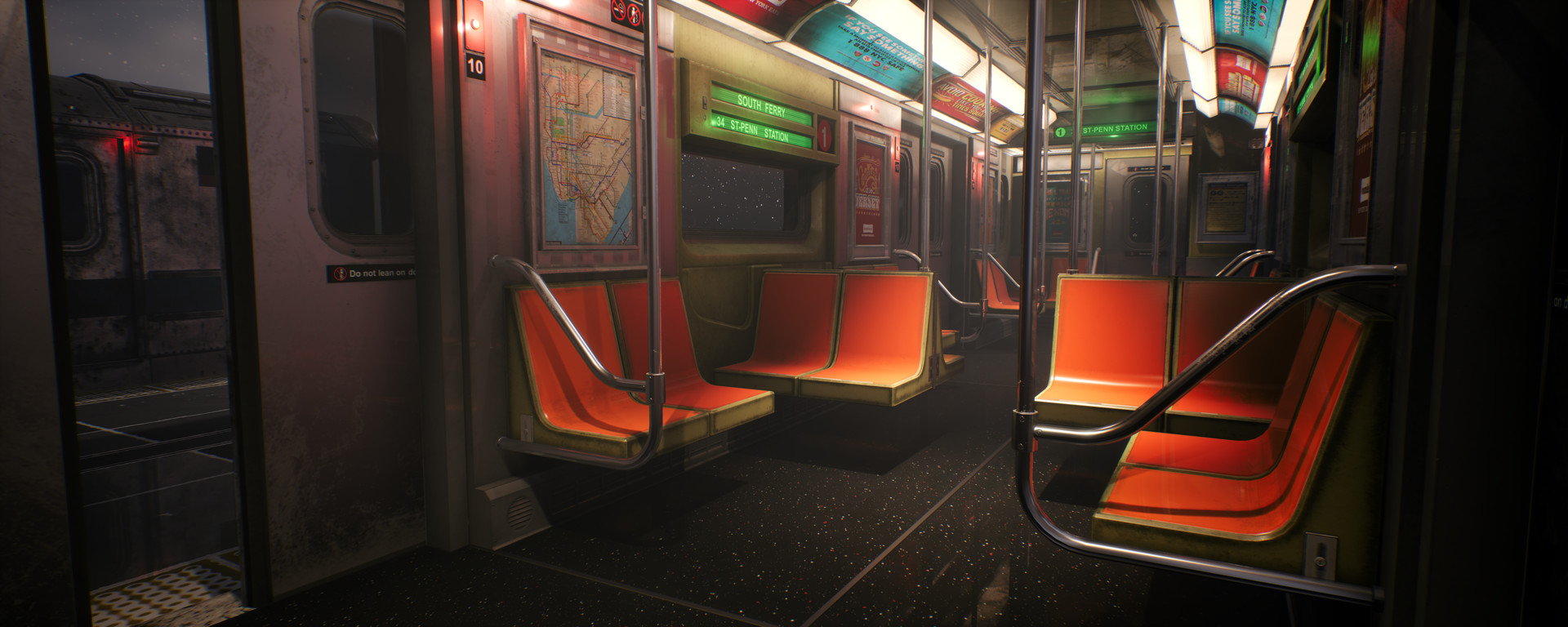
I have also changed some bits on the interior of the train, the main thing was is the lighting. On my old images, the contrast was way to much and it made the train feel more bright than it should of been, now that I have fixed that the train feels way more moody and fits the overall environment more!

I plan to scatter some of the generic trash inside the train and dirt up the chairs and walls a bit more, once I have done this I will decide if I need to add any more props into the interior to help tell the story of the environment, such as someone living in the train. 


That's all for this blog post, I may do another one at the end of this month depending of what I get done, but If I stick to my plan the project should be nearly complete by then which means I will hold of on another blog post and just post the final environment to my page. 

Thanks for reading and I hope you like the images!

If you have any feedback or ideas for interior of the train please let me know!

Report

Train Environment Props

Work In Progress / 15 September 2019

Hey everyone:)

I just wanted to make a quick blog post to show some to props that I have been working on over the last week for my train environment. I've been sticking to my schedule quite well and I've made some really good progress on the level. Hopefully, If I stick to my current pace, the environment should be done towards the end of next month. 

The first image that you can see below is a in game screen shot of my environment, I have placed a lot of the props that you will see in this blog post around the level just to show what they look like in game, the current placement of them will be different in my final level. 

This is a pillar that goes above the train and connects the wires together. 

This is a platform sign so that you can tell the time and the next train that is coming,

This is a simple cone as a filler asset, I need to make a lot more generic props like this one to fill out the scene more, such as rubbish, destroyed cardboard boxes etc. 

These pallets are more filler assets for the scene.

This is pillar for the platform to hold the roof up, I will add signs and pay phones attached to these in game.

This is platform roof. 

The next model that I am making is a payphone which is a hero asset so I may do a Artstation post for that prop as it's quite detailed. I will also do another blog post at the end of the month to show more progress on the environment. 

Thanks for reading!


Report

Life and Project Update

Work In Progress / 30 August 2019

Hey everyone:)

It's been a few month since I last posted any update on my Train game environment. I keep planning to finish the project but life keeps getting in the way. Over the last two months I have packed up all of my stuff and moved to Liverpool to start a new job as an Artist at Firesprite Games. During this time I was without my PC for a month whilst I got everything sorted which meant that my personal work came to a grinding Holt.  It's been a stressful move but so far it has been really worth it and the job is great.

I am now all settled in to my new place and new job which means that I have no excuse to not get the project finished! Last week I made a Trello board with all the remaining tasks that needs to be done for the project to be complete. There are a lot of tasks to do and I won't be finished with the project until the beginning on November.  I have set myself the challenge of working on this project every night and weekend until it's done as I think I have been working on this project for too long now. You can see an image of my Trello board below with some of the remaining tasks: 

Over the last week, I have started working on the project every night and I have made a few props in this time which you can see below. 

Here, I have made the yellow railings modular kit that I can place in certain parts of the level.

I have also made this platform modular piece. 

I then went on to make a AC Unit to place around some of the walls, I'm also going to make some pipes and cables to go with this. 

I then made the pillars that going in the middle of the train tracks, I'm going to make a rust texture and vertex paint this on to the prop in game so I can get more variation to each pillar. 

I have also started testing the workflow to make some wet and destroyed cardboard boxes that I can scatter around the level which you can see below. 

With these cardboard boxes, I will set them up in unreal so that you can change the colour and the dirt amount, that way they can be a nice modular pack that will help fill out the scene. 

Moving forward, I will start to update my blog more on this project and in the next two months there will be a lot more work from me to show. 

You may of also noticed that I added a new portfolio piece focusing more on concept art rather than 3D environments. This is a project I did during my work dinners which you can see below: 

After, I have finished my train scene, I will be starting to do a lot more concept art projects and trying to improve my skills in that area so that I am able to do the full workflow of games from the concept all the way through to the final game engine level that you can play around. I think by doing this it will make more hire-able in the future and it will improve my overall skill set. I have always been interested in concept art and it's what I originally wanted to do as a job before I started doing 3D environments, I am now hoping to use the skills that I have learnt in 3D to help me produce my concept art pieces. In the image above, I started with a 3D block out and then painted and photo bashed over the top to get the image. The one good thing about doing this method is that I can see the overall image in around 10-20 hours of work whilst if I was to model this, it would take me a few weeks to see the final result. By doing proper concept art first rather than just quick sketches that I normally do, I will be able to check and make sure the scene works before I spend weeks of my life making it into a game level.  

When I first started at Firesprite, I was lucky enough to make friends with two really good concept artist who have helped me a lot with the concept side of things and given me advice and feedback on my last piece. You can check them both here:

https://www.artstation.com/jonashassibi 

https://www.artstation.com/vernonzwlee 

That's all I have to say for now and within the next two months you should see my train project finished. 

Thanks for reading:)

Report

Train Project Exterior

Work In Progress / 01 June 2019

Hey Everyone!

I just wanted to share a recent work in progress video of a train level that I am currently making. You can see the video below and I hope that you like it! 

If you have been following my blog posts, you will know that I have been working on this project for quite a few months now and unfortunately, it has been really slow progress so far. Over the past two months of not having a full time job, I thought that I would have plenty of time to finish this environment. However, I have spent the last two months doing several art tests for different companies to try getting another role in the industry. I have been very fortunate to get given  art tests to complete but unfortunately, none of the roles have panned out which means that I am still looking for a new role. 

Moving forward, I have a solid plan in mind for this project and an asset list that I have to work through to get this environment fully finished. I still have a lot more work to do and I think that it's going to take a lot of time. I don't want to rush the project and I think that once it is full finished it will be worth the time that it has taken. 

I have included some stills from the video below.

Thanks for reading:)

Report

Subway Train Ticket Machine

Work In Progress / 27 March 2019

Hey Everyone:)

If you have been following my blog post, you will know that I have been working on a environment based around a New York train station for the last few months in my spare time. Unfortunately, the project hasn't been going that well recently due to life getting in the way so it's all been very slow progress! However, I have recently been made redundant from my job at Immotion VR and I am now in the search for a new job. This means that whilst I am without a job, I have a lot more time to spend on this project so in the next few weeks you should see a lot more work from me. 

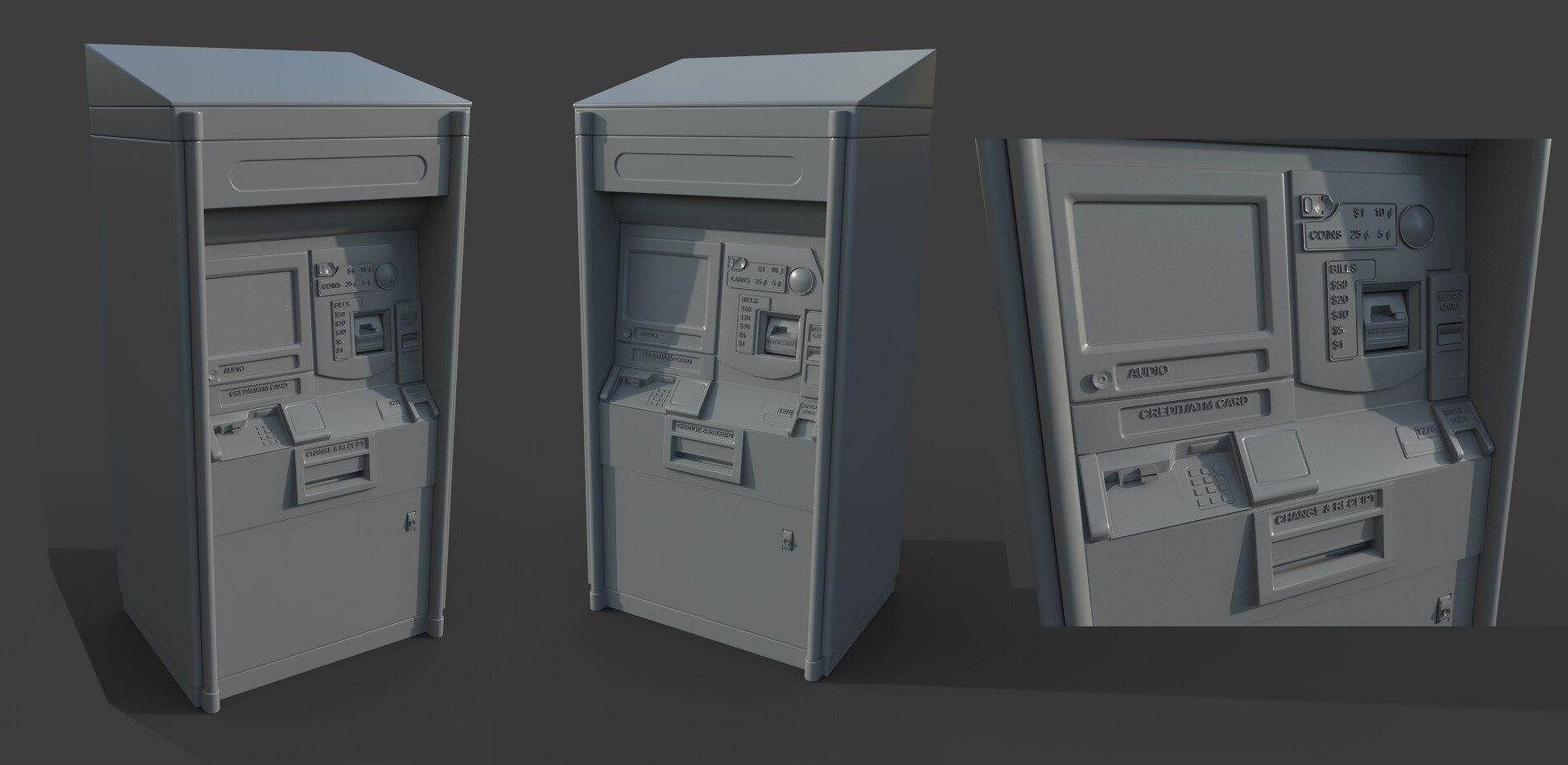
Moving onto give you all a update on how the train project is coming along, I have now finished the interior which you can see on my portfolio and I am now creating the exterior environment. I have started with this by making a hero asset of a New York subway ticket machine which will be placed on the platform, you can see an image below. 


I have just finished making the high poly model, and I will now be moving onto unwrapping the low poly and sorting out any smoothing mistakes I may of made. I'm hoping to get this prop done by the end of next week, I am spending a lot of time on it as I want this to be it's own portfolio piece as my current portfolio is lacking prop work.

Moving forward my checklist of things left to do on this train project are:

  • Model more props like benches, bins and trash
  • Finish making the graffiti generator in substance designer that I have been making for the graffiti on the train. (I will share more about this soon). 
  • set up master materials for the train so I can change the colour and dirt amount of them so each train will be different.
  • Model a more interesting platform- I have a concept in mind for this already. 
  • I also want to take a second pass at the interior and improve this. 

The end goal for this project is going to a be a cinematic video showing both the interior and exterior of the train environment, so I need to spend some time planning out the video and camera placement to get good compositions. 

As usual, I am open to any feedback and thanks for reading!


Report

Train Project- Interior

Work In Progress / 30 November 2018

Hey Everyone:)

I've spent the last week texturing the interior of my train and I just wanted to share with you all some work in progress images. 

There is still a lot to do on the project but I'm happy with my progress so far. You can see the images below and please feel free to give feedback!


I'm currently in the progress of making all the posters switchable and all the the decals on to their own texture sheet so that the text doesn't go the wrong way around when you mirror the train. I'm hoping that the train will be a fully modular asset including switchable posters and parameters to control dirt and colour for every object inside the engine so that once I am done I will be able to make a few variations. 

I am wanting to add a few smaller assets to the train to add more storytelling elements in the environment so stuff like trash and items that people may have left on the train. If you have any ideas of what I should include in the train, please let me know:)

My next update on this project will probably be in the new year now as I want to try and do the challenge that substance has just released as it seems like a fun project that will help me get better at texturing inside of painter. You can see the challenge here if you haven't seen it yet: https://www.allegorithmic.com/blog/x-taon-art-car-texturing-contest 

Thanks for reading!

Report